
chatgpt.com keeps reloading?
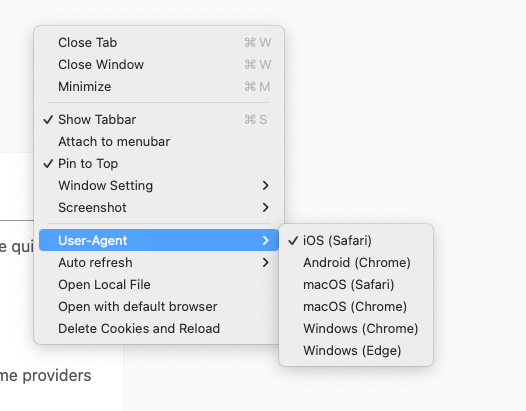
Click the browser window setting, try to change the user-agent setting.
And click the "Delete Cookies and Reload" item to have a try
If you are running into setup or activation problems, the guides below walk through the quickest fixes. Work through the steps in order and reach out at [email protected] if you still need help.
Click the browser window setting, try to change the user-agent setting.
And click the "Delete Cookies and Reload" item to have a try
The license email normally arrives within a few minutes. Run through these quick checks:
Include the email used at checkout so I can match your order quickly.
FloatBrowser Pro customers activate Monster with FloatBrowser app.
These errors usually come from time sync or a hung process. Try the following:
Send an email to [email protected] and include any proof of purchase (Stripe receipt, last 4 digits of card, etc.). I will update the email and resend the license.
Reply directly to your license email or contact me at [email protected]. Include your purchase email, screenshots, and the steps you already tried so I can fast-track the fix.